
Cazimbo Online Mobile App – Play on iOS and Android
If you love playing on your phone, Cazimbo Casino is already tuned for mobile so you can spin, bet and cash out straight from your browser on iOS and Android. You will not find a separate store app; you get a fast mobile site plus a handy “Create Shortcut” option that behaves like a Cazimbo Casino mobile web app.
Introduction to Cazimbo Mobile Experience
Here is the thing, our whole website is built to resize and run smoothly on phones and tablets, from the burger menu to the games grid and betslip. You can jump between Casino, Live Casino, Jackpots, Sportsbook, Live Betting, Virtual Sports, Challenges, Bonus Crab, Shop and VIP Levels with one tap from the mobile sidebar or footer links.
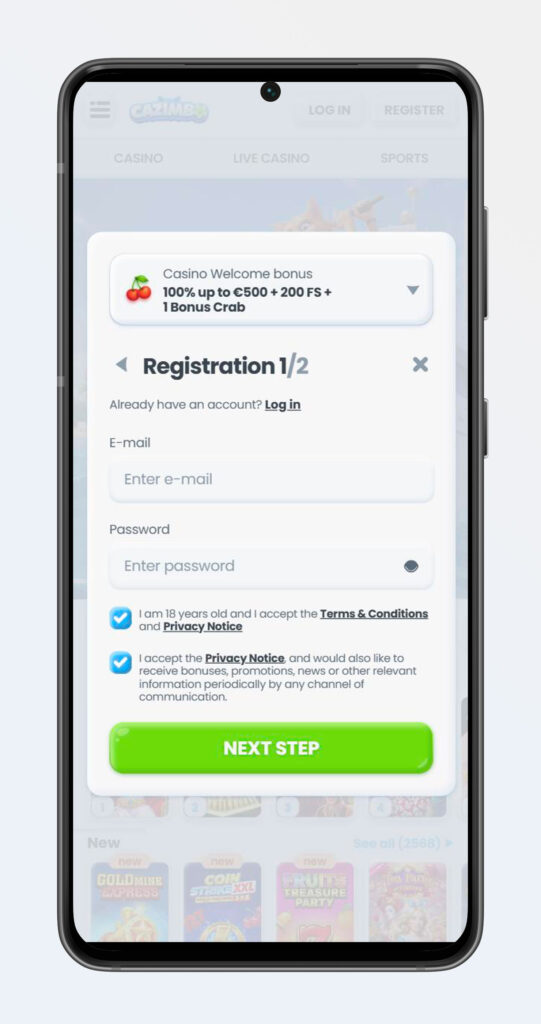
You will also see the same secure connection, cookies banner and responsible‑gaming tools on mobile as on desktop, so your data stays encrypted and gameplay safe while you are on the move. Bottom line: if your device can open a modern browser, it can handle Cazimbo.
How to Install the Cazimbo Web App (PWA)
Now, while Cazimbo does not make you download a separate app, you can still “install” Cazimbo as a web app icon on your home screen. In the footer, you will find a dedicated “Create Shortcut” page that explains how to add Cazimbo to your device for one‑tap access.
Installing Shortcut on Android Devices
On Android, the process of installing Cazimbo Casino is super quick and works in Chrome, Edge and most Chromium‑based browsers.
Steps to add Cazimbo on Android without downloading:
- Open your browser, go to Cazimbo.com and log in if you want.
- Tap the browser menu (usually three dots in the top right).
- Choose “Add to Home screen” or “Install app” when you see the prompt.
- Confirm the name “Cazimbo” and tap “Add” so the icon appears on your home screen.
Once you do that, Cazimbo opens in a clean standalone window without the browser address bar, so it feels very close to a native Cazimbo casino app.
Adding to Home Screen on iOS Devices
On iPhone and iPad, you do almost the same thing through Safari. You get a Cazimbo icon on your home screen that opens in its own window and keeps you logged in as long as cookies are allowed.
Steps to add Cazimbo Casino on iOS without downloading:
- Open Safari, go to Cazimbo.com and log in.
- Tap the Share icon in the bottom bar.
- Scroll and pick “Add to Home Screen”.
- Confirm the name and tap “Add” to drop the Cazimbo icon onto your home screen.
If you like, you can repeat this trick for specific sections like Sports, Live Betting or Instant Games for quicker access.
System Requirements and Compatibility
Honestly, if your phone is not ancient, you will be fine. Cazimbo Casino runs in modern mobile browsers without downloading, so the main requirement is up‑to‑date software and a stable internet connection.
Minimum you should aim for:
- OS for Cazimbo Casino: recent Android and iOS versions that still receive browser updates.
- Browser: latest Chrome, Safari, Firefox or Edge with JavaScript and cookies enabled.
- Connection: 4G or Wi‑Fi is recommended, especially for live casino and in‑play betting.
- You must also be over 18 and in a jurisdiction where online gambling with Cazimbo is allowed under our Terms.
If you ever hit visual glitches, clearing the browser cache or rotating the screen usually cleans it up quickly. No need to download any additional apps to play at Cazimbo Casino.
Mobile Site Features and Navigation
Now you have Cazimbo on your phone, what does the interface actually feel like? We designed the mobile layout around the burger menu and footer navigation so you are rarely more than two taps away from your favourite section.
User-Friendly Interface and Design
You will see the Cazimbo logo at the top, with small “Log in” and “Register” buttons and a burger icon that opens the full sidebar. That sidebar lists Casino, Live Casino, Jackpots, Sports, Live Betting, Virtual Sports, Challenges, Tournaments, Bonus Crab, Shop and VIP Levels, all optimised for smaller screens.
Under that, you have category grids, filters like Top, New, Popular, Exclusive, Megaways, Bonus Buys and Arcade, plus a responsive search bar where you can type game names or providers. Bottom line, you scroll, tap a tile, and the game or page opens in a full‑screen view tailored for touch controls.
Accessing Sportsbook and Live Betting
Accessing sports on mobile is as simple as switching tabs. From the sidebar or footer, tap “Sportsbook” for pre‑match bets or “Live Betting” for live markets; you will see separate links for each in the navigation and footer sports block.
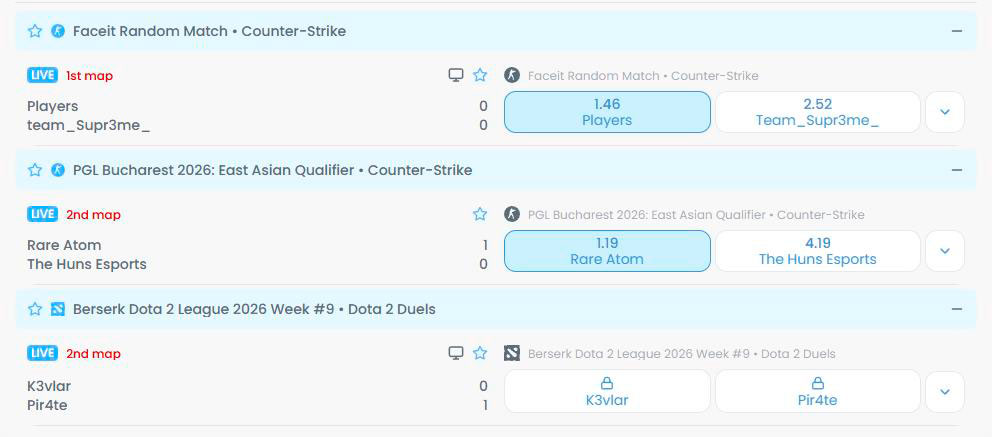
What you can do in mobile sports:
- Browse league lists like football, basketball, tennis, hockey and more via quick category links.
- Open match pages, build singles, multis and system bets, and send everything into the betslip.
- Switch to “Live Betting” to see in‑play odds and place live wagers in real time.
- Jump to “Virtual Sports” if you want fast‑settling virtual events between real matches.
The betslip sits at the bottom of your screen or opens in a panel, so you can edit stakes and confirm bets with your thumb only.
Mobile Casino Games and Live Dealer Tables
From the Casino and Live Casino entries, you get the full Cazimbo portfolio on your phone. The footer has direct links to categories like Slots, Table Games, All Games, Top Live Casino, Roulette, Blackjack, Game Shows, Baccarat & Dice, Poker and All Live Casino Games so you do not have to dig around.
Games open in mobile‑friendly HTML5 mode, so you can spin, tap hit or stand, or place chips with simple touch gestures. If you are into live dealers, the streams automatically adjust resolution to your connection, and you can still use side‑menu controls and in‑game bet history on mobile.
Gaming on the Go: What to Play
Now, the fun part: what actually works best when you are playing Cazimbo on the bus, couch or during a half‑time break. Almost the full desktop catalogue is available on mobile, with a couple of categories that shine particularly bright on smaller screens.

Mobile Slots and Jackpots
Slots are the easiest thing to grind on a phone, and you can access them directly from the “Slots” and “All Games” links in the Casino block. For big‑win hunters, you also get separate mobile‑friendly Jackpots sections: Hot Jackpots, New Jackpots, Lucky Jackpots, Jackpot Play, Daily Jackpots, Drops & Wins and All Jackpots.
If you are chasing quick entertainment, you can filter by Top, New, Megaways, Bonus Buys or Exclusive to find a slot that matches your mood. Touch controls make single‑handed spinning super comfortable in portrait mode while you keep another app or chat open.
Instant Games and Arcade Options
Another standout on mobile is our “Instant Games” and arcade‑style titles. In the footer navigation, you will see an “Instant Games” link under Casino, which takes you to crash, mines, plinko‑style and other quick‑resolve games that feel made for short sessions.
These games load fast, settle quickly and fit perfectly into a few spare minutes, so they are ideal when you want action without committing to a full slot session or long live‑table round. Cazimbo’s arcade section is also where many gamification‑friendly titles live, which pairs nicely with Coins, Weekly Challenges and Bonus Crab while you are out and about.
Account Management via Mobile
Here is the thing: you do not need a laptop to handle your account basics at Cazimbo. Everything from registration to banking and bonus activation works via the mobile interface using the same encrypted network and payment systems as the desktop.
Registering and Logging In on Mobile
From any mobile page, the header holds “Register” and “Log in” buttons sized for thumbs. The registration flow uses the same form as desktop, with fields for personal data and account credentials, and once you are verified, you can access all sections, including promotions and VIP.
You are allowed one account per person, household, phone/email and IP address, and you must be at least 18 and in a non‑restricted jurisdiction under our Terms. If you forget your password, you can trigger a reset from your phone and complete any KYC checks directly by uploading documents through the secure website.
Making Deposits and Withdrawals on the Go
On mobile, you can open the “Payments” page via the footer or sidebar and see all available methods in your region, including Visa, Mastercard, Interac e‑Transfer and others. That same Payments section is referenced from both desktop and mobile and lists per‑day and per‑month withdrawal limits by VIP level and currency.
What you can manage from your phone without downloading the Cazimbo mobile app:
- Make deposits using your saved card or another supported method.
- Request withdrawals, subject to rollover rules and VIP‑based limits per day and per month.
- Track pending withdrawals (up to three at a time), and see status changes.
- Contact Live Chat directly from the floating chat widget if something goes wrong.
Big plus, the financial department processes withdrawals in line with the same 3‑business‑day timeframe regardless of whether you request them from mobile or desktop, as long as KYC checks are done.
FAQ
No, we do not offer a separate downloadable Cazimbo app; instead, you use our fully responsive mobile site and the “Create Shortcut” option to add Cazimbo as a web app icon.
Yes, you can open “Live Betting” from the navigation and place in‑play bets across football, basketball, tennis, esports and more, using the same odds and markets as desktop. No need to download the Cazimbo mobile app for this.
Almost all HTML5 slots, table games, live tables and instant games are accessible under Slots, Live Games, Arcade and Live Casino categories; everything in those menus is optimised for touch. No need to download the Cazimbo Casino mobile app.
Yes, all Cazimbo bonuses and promotions, including welcome offers, reloads, cashback, Bonus Crab and Shop rewards, are available and manageable via mobile as long as you meet their specific Terms and wagering rules. No need to download the Cazimbo mobile app for this.
Your connection is encrypted on all devices, and our Responsible Gaming and age‑verification rules apply equally on mobile and desktop, but you are responsible for making sure online gambling is legal in your country and that you are 18+.